The Thornium Layout
The context
I’m a software engineer, typing most of my days on an computer, so for me it is important to do have the right tools for the job…
Since I started using computers, I have been using azerty, then, when I realised there were more optimised layouts (in beginning of 2000s), trying dvorak, learning to touch type with bépo, switching to workman on my ergodox a few years back. But I wanted something where I ‘moved’ my hands less, so hence the new layout.
About a year ago, at the same time that build my first cantor keyboard (42 keys), I switched from the workman layout to handsdown, first vibranium, then rhodium layout. I took some weeks to perfect the layers of my keyboard, until a day where I posted it on reddit, and a comment mentioned the possibility to have one key dedicated to “thorn (þ)”, in practice the “th” digraph. I got curious and there began the second part of my handsdown journey, to tweak the rhodium to my liking, which turned to become another variation of the handsdown altogether I guess.
Introducing Thorn (þ)
The idea of introducing “Th” as its own key sounded appealing to me since data shows that “Th” appears more often in the english language than a bunch of letter: b, c, f, g, j, k, m, p, q, u, v, w, x, y, z. The Th bigram counts for 3.56% of english bigrams. It actually makes sense if you consider the fact that þ actually was its own letter in “þe olde english tong”.
Discuss adaptation of typing Th as one letter instead of two
What I believed would be the biggest challenge was adapting to using that new key instead of t+h, but in reality, it went really fast, like a week or so. It seems actually much simpler for my brain to associate one key to one sound, than to decompose in this case the “th” sound into t+h. So every time I need to type “this” or “that” or “thing” I just reach for the Th key now. Obviously, there are some exceptions, where i use T+H, eg in “righthanded”, because that does not include the sound I associate with Th. And maybe for my sanity it’s better to stick with the decomposed t+h in that case. This is probably because when I type, I hear what I’m typing more that I see it…
Qu, another bigram?
The case of Q is rather special. In english prose, it is utterly rare to have an isolated Q, without the following U. Hence, one could be tempted to just plain and simply replace Q with the Qu bigram. But a lot of shortcut in many programs nowadays (among which ctrl+q) do use Q on its own, not mentioning its usage in programming. So it’s not reasonable to have Q just plainly replaced with Qu. However, what I implemented in my firmware was taking advantage of the fact that, in prose, Qu never ends a word, but rather it is always followed by a vowel (or an apostrophe in french). So if pressing Q is followed by pressing a vowel or apostrophe within a short timespan, U is automatically inserted there. In prose, never have I encountered a counter example to this mechanism where the u was inserted when I needed it or vice-versa. But there are exceptions in programming, for example the neovim command (neo)vim’s “:qa”. So I did add an exception for that case, because I use it quite often, and also have a timer to drop the potential U after half a second of inactivity, so I can always wait it out of other cases arise.
The left ring/pinky column swap
One major pain point for me was the “sc” sequence of letters, which on the rhodium is an outward roll with ring and pinky, left hand. It really did not work for me. Maybe because I work with a lot of scientists, meaning the word “science” comes more often, but I much preferred having an inward roll. The handsdown page mentionned that swapping the two columns was a possibility, so I did, about 6 months into the journey. Boy, was I in for a ride!
Obviously, the “sc” sequence became much better (along with a very convenient “wh”), but I had to relearn all these 6 keys, and probably because they are so close to their former positions, I still feel the confusion with this today. I’m not regretting doing the swap, just frustrated it took so long for my brain to rewire. In retrospect, I should have done it much earlier, as soon as it became clear “sc” wasn’t working for me.
Now, let’s have a look at each layer in detail
Base (programming) layer
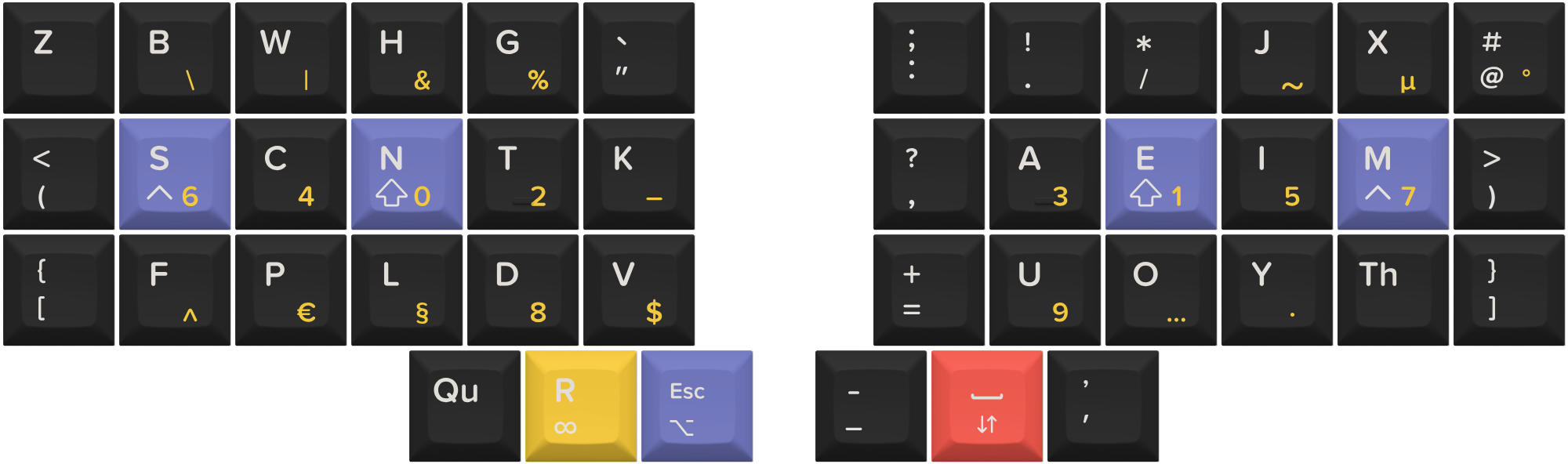
The base layer is the programming layer. The alpha keys layout is a variation the hands down rhodium layout. I like the rolling aspect and the fact that it was designed for keyboards with thumb clusters, with the letter R on one of the thumb keys.
As Jonas Hietala points out, for programming, equal sign, parenthesis and underscore need to be first class citizens, thus they are directly accessible on the layout. Hence this layout makes use of the custom shift keys qmk library, so that I can really decide what punctuations I have on each key and layer. The home row mods have been reduced to only shift and control as it seems like I have lazy lingering ring and pinky fingers, as I got quite a lot of misfires from them. Thus Alt is placed on held Esc, and Gui is on the Nav layer (as I only use it for window movements).
Underscore is next to space as they fill a similar function in programming: I use long_multiword_variable_names, hence using underscore a lot as word separator. - is on shift underscore as in my mind at least, they are variations on a theme. Talking about theme, the right cluster layer could be called the spacing cluster: on top of space and underscore/hyphen, the third key is assigned to apostrophe, which is in this programming layer the single straight quote. It is very seldom followed by a space in the languages I type in, so being next to space is not an issue.
Esc is on the other thumb, as it is important for nvim that I use. The numeric and symbol layer is a LT on R, and the nav layer is on space. I had Z and Q on the weak thumb keys, but I decided to move them out to leave space for two other keys: apostrophe as indicated above, and Qu.
Another bigram assigned to a key here is Th, as discussed above. Since it is quite common in english, this key replaces the W key on the right pinky, which has been moved to the left ring finger, replacing the apostrophe is in the hd rhodium original layout. This allows for the satisfying W H inward roll for which, what, who, why, etc.
The bigram keys are quite useful indeed, but slowed down my wpm on keybr originally as if they were new letters. I did learn them quickly though!
Base layer is accessed from the prose layers with the PLD combo.
English layer
Even though the base layer alpha layout is modeled for English, the symbols around it are made for programming. This layer is for prose, when writing notes, chat messages, or emails for example. To that aim, a couple of minor adjustments are made:
- curly brackets are replaced with open and closing quotation marks on left and right sides respectively. Single quotes unshifted, double quotes shifted.
- the simple straight quote ’ is replaced by a typographical apostrophe ’. In English it is the same character as single closing quotation mark, but for consistency with the other prose layers it is repeated here.
Multiple languages
Some context: I’m spending my days mostly programming, but also chatting in english, answering emails in swedish, and communicating with the family in french. So I do need differentiated layers for the two extra languages.
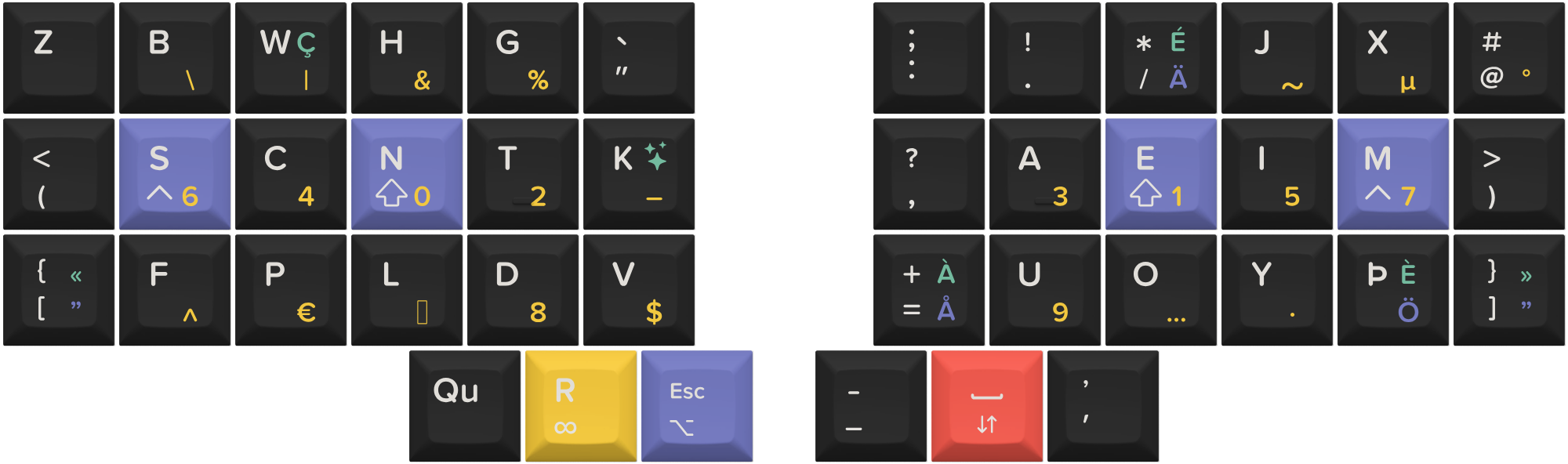
Here is the the layout with the Swedish and some French characters added:
Swedish layer
Only a couple of changes compared to the English layer:
- Adding ÅÄÖ to the keymap, with Ä in the strongest position since it’s the most common of the accented letters. Ö replaces Th on the right pinky, as the digraph is quasi-inexistant in (modern) Swedish.
- The quotation marks in Swedish are right double quotes both for opening and closing, so these are put on the curly bracket keys, on both sides
Swedish layer is toggled with the SE combo.
French layer
French layer implements its own couple of changes:
- a couple new letters, É is replacing / on the right middle finger, and À is replacing = on right index, È on Th.
- Ç is replacing W, which is very rare in French, and is thus conveniently placed above C.
- for accessing the other accented characters (ê, î, ô, ù, û, …), I introduced a magic key instead of K (which is very seldom). The magic key idea I stole by reading the description of the ergo-l layout (layout for french and english), to access accented characters. It’s basically a OSL for different accented characters and dead keys. One key to note on that magic layer is the bigram Où key, since the only occurence of the letter ù in french is in the word “où”.
- So why did I not put all the accented letter behind the magic key? Because it would be too many key taps to access the common ones all the time. Instead, I put the common accented character on the “base” french layer, replacing some letters (K, W), but these are available using the magic key. Since they are so seldom, and in the same location after the magic, it’s not noticeable.
French layer is toggled with the FR combo.
A note on the capitalisation of bigram keys
I implemented a shifting scheme in qmk so that the Th and Qu bigrams can be shifted correctly: “th” by default, “Th” when shift in held, “TH” when caps word is on. Same thing for “Qu”. You can see the implementation here
Navigation layer
As might be expected, the arrows, page up/down, home and end are there. One-shot mods are put on the left hand for alt, shift and control, along with the gui modifiers. This allows for gnome window management shortcuts, eg gui-alt-shift that moves a window to another workspace. The OSMs are for lesser used shortcuts with alt, and in general to get a feel for Callum-style mods.
For alt-tab (switching windows), holding esc and pressing tab is a comfortable stretch, so no need for this layer as I originally envisaged.
Symbol layer
The symbol layer gives access to numbers and less common characters for both programming and prose writing. It is toggles momentarily by holding the left thumb on R.
A few symbols are indicated in the rhodium layout, but I moved some of them, as I consider them to be really dependent on one’s main activities.
Numbers
I follow the layout of J. Hietala as I think it makes sense. Time will tell how good it is in the long run.
Non-breakable spaces
Very simply, the narrow nbsp is on the space key, and shifting that gives the regular nbsp. I use the narrow variant more often, for french high punctuation, and number separators like in 1 000 000.
Combos
Nothing very fancy here, maybe just noteworthy
- enter on right home row index and ring finger
- tab and backspace on left and right middle and ring fingers, top row to remind of the classic positions of these keys on regular keyboards.
to conclude
This layout is a personal evolution of the hd rhodium layout, tailored to my multilingual and programming-heavy workflow. It’s still a work in progress, but I’m quite happy with the direction so far, particularly with the integration of custom layers for English, Swedish, and French, as well as thoughtful key placements for programming and typography. I hope sharing my setup and thought process sparks ideas for others and invites constructive feedback. Huge thanks again to the community for the inspiration and tools to tinker!
Using QMK Callum type mods Rhodium keymap implementation
Addendum: Things I tried but abandonned
- on prose layers, underscore was replaced with hyphen (the ascii hyphen-minus character to be exact, as it is accepted as hyphen character in modern typography), and shifting this key produces an en dash, useful for date ranges for example. In practice, I never used the dash, and it was really confusing to remember if I needed a shift or not to make a hyphen.